How to fill out an airline ticket when buying online
If you are
buying airline tickets online for the first time, then you might wonder how to fill in passenger data for purchasing an airline ticket. In
fact, it's simple: follow the instructions on the website where you are making the purchase. In
this article, we will show all the steps for booking a ticket on the
kupi.com.
After you select the desired ticket and click «Buy», a page will open where you need to fill in
the data.

Contact Information
Enter your email and phone number. We will send the ticket to your email, and also send notifications about flight changes or in case of other emergency situations.


Enter Passenger Data
Here you need to specify the document type, its details, full name, date of birth, and gender. To avoid any issues, let's look at each point in more detail.
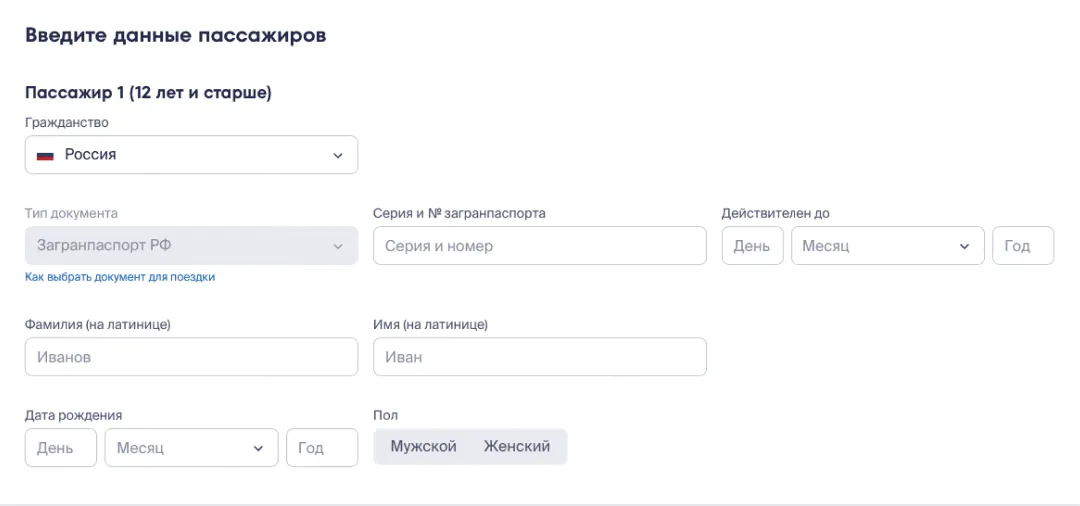
1) Citizenship. Determined by the country that issued your passport. If you have citizenship of
several states, you must specify which passport you will use during your trip.
2)
Document type. Choose which passport you are flying with. This can be an internal passport or an
international passport.
3) Passport or international passport series and number. The
ticket is issued for the document you are flying with. You will present it during flight check-in
and border control, if you are flying abroad.
The series and number of an international
passport are indicated without spaces and the «№» sign. For flights within Russia, you can use
either an international or a general civil passport. For children – a birth certificate or an
international passport. For international flights – only an international passport.
4)
Valid until. The validity period is indicated only if the ticket is issued for an international
passport. Birth certificates and general civil passports do not have a validity period.
5)
Last name and first name. Data for a Russian citizen's passport must be entered in Cyrillic, and
for international passports and foreign documents – in Latin.
In a general civil
passport, the owner's data is indicated only in Russian letters, but if you have a new-style
passport (issued after 2011), you can find the Latin spelling on the photo page: at the very
bottom there is a machine-readable entry where, after the inscription PNRUS, your first name,
patronymic, and last name are indicated in Latin letters.
Please note that if your
patronymic ends in «vich», in the machine-readable entry it may be indicated as «VI3». For
example, instead of IVANOVICH, it might say IVANOVI3. This is an incorrect spelling, and VI3
should be replaced with VICH.
If you have an old-style passport, use the online
transliteration service on the website
http://translit-online.ru/pasport.html. It will perform
transliteration
in accordance with the requirements of the migration service.
Table of transliteration of first and last names for international passports
а — a б — b в — v г — g д — d е — e ё — e ж — zh з — z и — i й — i к — k л — l м — m н — n о — o п
— p р — r с — s т — t у — u ф — f х — kh ц — tc ч — ch ш — sh щ — shch ы — y э — e ю — iu я —
ia
Using the transliteration service or independently, using the transliteration table
above, data for children under 14 years old, who can fly with a birth certificate, are also
entered.
6) Date of birth is indicated in the format recommended on the website. As a
rule, this is dd. mm. yyyy.
That's it — you have entered all the data required to
purchase a ticket on Kupi.com. By the way, if you have registered
on Kupi.com and
continue to buy tickets on Kupi.com, you won't have to fill in this data again: it will be saved
automatically.
So, when purchasing a ticket in the «Already registered?» block, you
can click the «Log in» button, enter your login and password — the data will be filled in
automatically. You can also log in via Tinkoff ID — the data will also be pulled into the fields.
But don't forget to double-check them before payment, as even a single letter change can be paid,
and sometimes not possible at all.

You can make your flight easier by understanding
how to check in online for a flight. This service allows you to choose a convenient seat on the plane and avoid arriving at the
airport early to check in. We will do it for you and send the boarding pass to your email. All you
have to do is proceed to boarding.
Fly smart — fly with Kupi.com!